Products

Battery, local control and Equaliser

The battery stores energy. The Node measures the site and controls the equipment. The Equaliser software uses prices, tariffs and expected load to calculate the plan. spotEQ supplies and commissions the complete system.

System

The three parts

The battery, Node and Equaliser are configured and delivered as one system.

01
On site

spotEQ Battery

The battery stores energy and supplies it back to the site when the plan calls for it. Power and capacity are sized separately from the site's meter data, with expansion options confirmed for the selected configuration.

  • Supplied as part of the complete installation
  • Operating range set for the selected battery
  • Solar production can be included in the calculation
Battery specifications →

03
Software

spotEQ Equaliser

The Equaliser combines the site's tariff, day-ahead prices, expected load and equipment limits. It calculates a 48-hour plan and shows the result.

  • Measured, forecast and scheduled power
  • Projected savings and active alarms
  • Access set by organisation and site

Equaliser specifications →

Operation

How the system operates

The Equaliser calculates the plan. The Node carries it out on site and reports the measured result.

1

Measure

The Node reads site consumption, battery charge and the status of connected equipment.

2

Calculate

The Equaliser combines tomorrow's prices with the site's tariff and expected load.

3

Plan

A 48-hour plan is created and checked against the limits for the site and each asset.

4

Control and report

The Node carries out the plan. Measured values are compared with the plan and deviations are reported.

Equaliser

What appears in the Equaliser

The site overview shows the current condition, the latest plan, projected savings and active alarms.

  • Projected savingsEstimated cost compared with a model of unoptimised operation.
  • Energy scheduleWhen equipment is expected to consume, charge or discharge.
  • Current valuesSite power, battery level and recent trends.
  • Prices and forecastThe inputs behind the plan, including the assigned tariff.
  • AlarmsClear notice when data, equipment or execution needs attention.
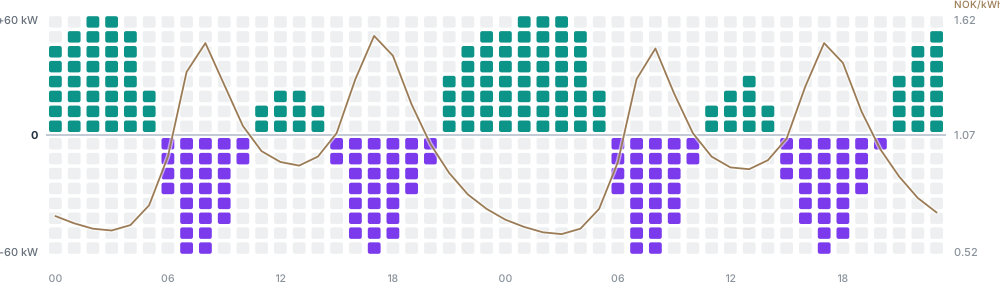
Example 48-hour battery plan
Illustration of battery operation against electricity prices
Battery example
Charge / consume915 kWh Discharge / produce806 kWh Peak power60 kW
Example 48-hour plan showing energy consumption, production and electricity prices by hour.
Charge / consume Discharge / produce Electricity price Each band is one hour
Limits and fallback

What happens on site

The Node runs the plan locally and applies the configured operating limits before values are sent to the equipment.

01

Shadow mode

The Equaliser creates and displays plans without sending them to the equipment. Automatic operation starts after the test period has been reviewed and approved.

02

If the connection is lost

The Node continues with the valid stored plan. When that expires, it uses the fallback agreed during setup. Operating limits remain active and stored measurements are transferred when the connection returns.

03

Changes and alarms

Changes are recorded with the time and user. Alarms and schedule status are recorded as events. High-severity alarms are also sent by email.

Electrical protection:

The system controls energy use. It does not replace the building's fuses, circuit breakers or other electrical protection.

Equipment

Equipment that can be included

The system can include a new battery or compatible battery equipment already on site. EV charging control is in development. Other controllable equipment is assessed separately before it is included in a proposal.

Where a model is not yet supported, we assess the work required and make that visible in the proposal rather than discovering it during installation.

Battery storageStore energy and cover peaks
EV chargingCharging control is in development
Flexible loadsCompatibility and operating limits assessed per project
Solar productionInclude local production in the site picture
Site meteringMeasure actual import, export and demand
Delivery

From agreed proposal to automatic operation

The scope, equipment and expected result are agreed before installation starts.

1

Scope agreed

The equipment, site limits, installation work and operating assumptions are confirmed.

Before the order
2

Installation

The equipment and Node are installed. Meter readings and connected assets are checked on site.

Planned with the site
3

Shadow operation

The Equaliser calculates plans and records the expected result without controlling the equipment.

Reviewed before activation
4

Automatic operation

Automatic control is enabled after approval. Measured operation, estimated savings and alarms are then followed in Equaliser.

Handover and monitoring
Before installation:

Agree site access, any interruption to supply, the people responsible for alarms, software charges and the support scope. Pilot terms are agreed individually.

Technical reference

Start with the meter data

We calculate what the system would have saved before making a proposal.