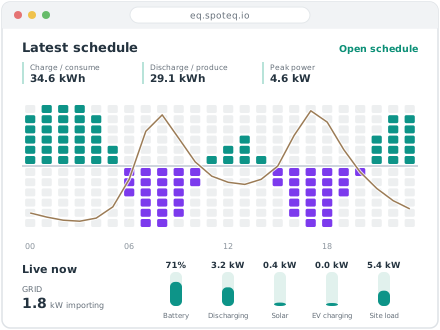
What the Equaliser does
One plan per site, recalculated as prices and conditions change, with prices, forecasts and measured operation shown alongside it.
A new plan every 15 minutes
The schedule covers 48 hours in 15-minute steps. It is recalculated every quarter of an hour, and again when prices, the tariff or the available equipment change.
Uses your electricity tariff
Spot price, supplier markup, network energy charge, tax and VAT are combined into an effective price for each interval. The capacity charge is handled separately, as a price per kW for the calendar month.
Load forecast from the site's own history
Expected consumption is built from what the site used at the same time of day and day of week in recent weeks, adjusted to the current level. Intervals with faults, missing data or manual testing are left out.
Checked again before it is sent
Every schedule is validated against the site and asset limits before it goes to the Node. A schedule that fails is not sent, and an alarm is raised.
Alarms that reach a person
A site that goes offline, a meter that stops updating or a schedule that is rejected raises an alarm. High and critical alarms are sent by email. Repeated observations of the same fault are grouped into one alarm.
Access per organisation and site
Users get access to the sites they work with. Installer access is time-limited. Changes are recorded with time and user.
Using Equaliser
What you can adjust
Authorised users can update operating settings for connected equipment within its permitted limits. Battery settings include the energy reserve and charging limits. Site access is assigned by role.
What projected savings mean
The displayed saving compares the planned cost with a model of unoptimised operation over the same period. It is an estimate based on the forecast and configured tariff, not a confirmed reduction in the electricity bill.
Who follows up alarms
Alarms appear in the site overview. High and critical alarms are also sent by email. Recipients and responsibility for follow-up need to be agreed for each installation.
Access and recurring costs
Equaliser runs in a web browser. Before ordering, agree who needs access, the software charges and the support scope for the site. Pilot terms are agreed individually.